Sign up and the bar-number check
LexBooks is for attorneys admitted in a US state or territory, and for their firms. When you sign up, you create your own account and your firm's workspace at the same time. Your first 30 days are free, and no card is needed.
Before you start
Have these ready:
- your work e-mail address;
- a password of at least 12 characters;
- the name of your firm;
- the state where you are admitted, and your bar number.
Steps
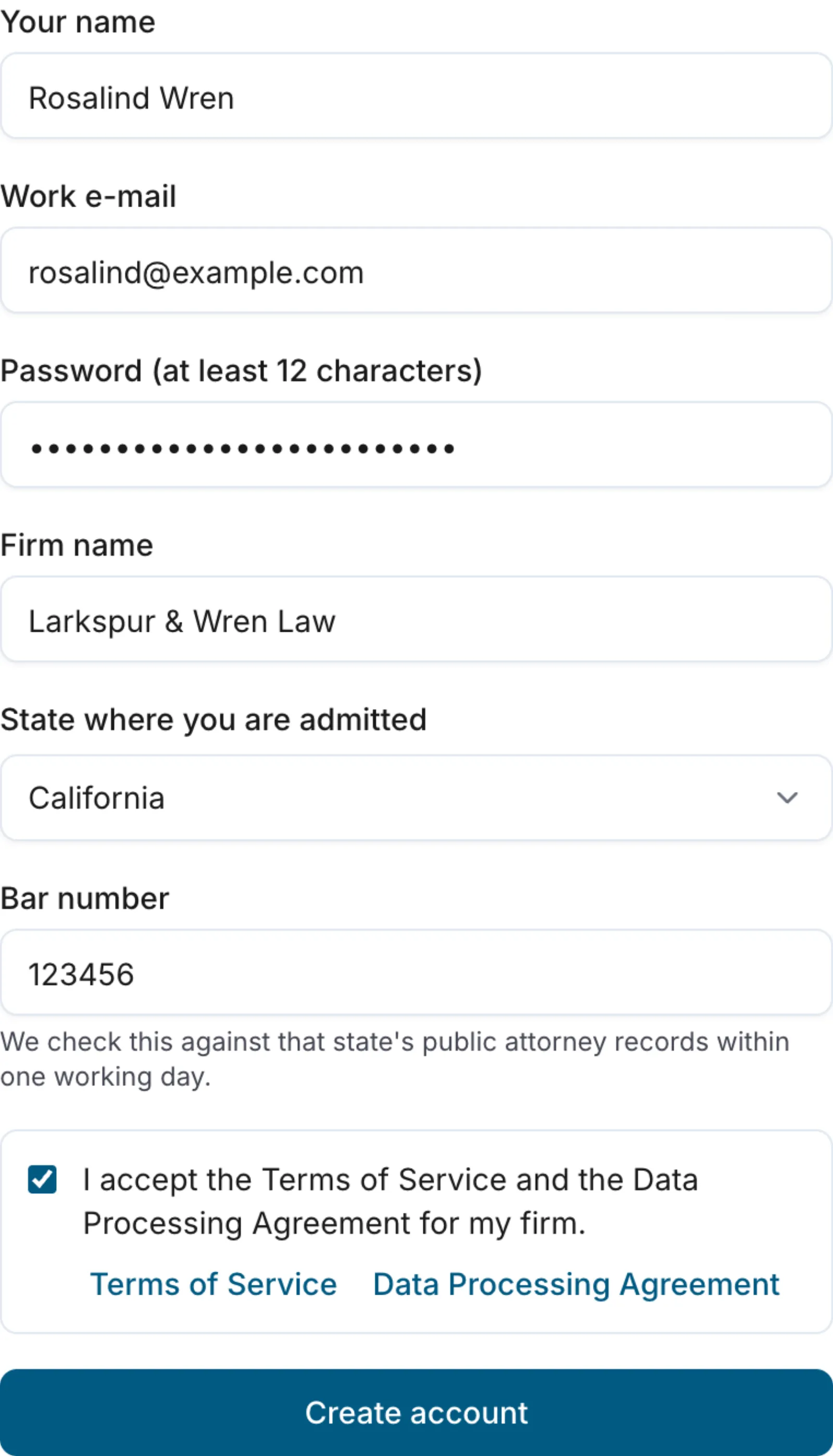
- Go to www.lexbooks.app and click Start free trial.
- Type your name in Your name.
- Type your e-mail address in Work e-mail.
- Choose a password of at least 12 characters and type it in Password (at least 12 characters).
- Type the name of your firm in Firm name.
- Choose your state in State where you are admitted.
- Type your number in Bar number.
- Tick the box that starts I accept the Terms of Service and the Data Processing Agreement for my firm. You can open each document from the links under the box and read it on the same page.
- Click Create account.
- Open your e-mail. Find the message from LexBooks, sent from notices@lexbooks.app, with the subject “Confirm your LexBooks account”.
- Click Confirm my address in the message.
- On the page that opens, click Confirm my address again. LexBooks sets up your firm and opens your workspace.
The first screens
The first time you sign in, LexBooks greets you and asks a few short questions.
- Click Let's get started.
- LexBooks asks Do you advise on privacy or AI governance? Click Yes or No. If you are not sure, click Skip for now. You can change the answer later in Settings (see The “Privacy and AI governance practice” setting).
- Click Go to your matters.
- If LexBooks shows Before you start, read the two documents, tick the box and click Continue.
The bar-number check
We check your bar number against your state's public attorney records within one working day. While we check:
- you can use LexBooks fully with your own data: add contacts, open matters, record time and prepare letters and invoices;
- you cannot yet send anything to a client. If you try, LexBooks shows Sending opens after the bar number check. Click Save and close: your work is kept, and you send it once the check is done.
A line under the menu tells you where the check stands. We e-mail you when it is done.
A few states and territories have no online attorney record (New Hampshire, South Dakota and the Northern Mariana Islands). For those, LexBooks does not ask for a number, and sending is open at once.
To see or correct your number later, open Settings and find the card Your bar number.
If you forget your password
- On the sign-in screen, click Forgot password?.
- Type your e-mail address and click Send reset link.
- Open the e-mail and click the link.
- Click Continue. If you use two-step sign-in, type the code from your app first.
- Type a new password of at least 12 characters in New password and again in Confirm password.
- Click Update password, then sign in with the new password.
What happens next
Your 30-day free trial starts on the day you sign up. Next, turn on two-step sign-in.
If something looks wrong
- The page says “LexBooks is open by invitation”. Sign-up is closed for the moment. Click Request an invitation, tell us about your firm, and we will write back.
- No confirmation e-mail arrives. Look in your spam folder for a message from notices@lexbooks.app. On the “Confirm your e-mail address” screen you can click Send it again.
- The confirmation link says it has expired. A link works once. Sign in with your e-mail and password to finish, or sign up again to get a new link.
- “That bar number is already registered with LexBooks.” If the number is yours, write to support@lexbooks.app.
- The line under the menu says “We could not confirm your bar number”. Open Settings, check the state and number in Your bar number, correct them and click Save. Only a firm administrator can do this.