Turn on AI and choose how private it is
LexBooks has a few AI features: a summary of a matter, clearer wording for time entries, a first draft of a proposal's scope, and, where installed, review of documents and research on the law. They are all off until an administrator of your firm turns them on. Everything AI writes is a draft for you to check before you rely on it.
Where your material goes: the privacy levels
Your firm's matters are privileged by default. Each AI request is sent at a privacy level. The lower the number, the more private:
| Level | Name on screen | What it means |
|---|---|---|
| 1 | Local model (inside this installation) | The AI runs on the same computers as your LexBooks. Nothing leaves your installation. |
| 2 | Own servers (no model provider) | The AI runs on servers your firm or its operator controls. No outside AI company sees the material. |
| 3 | Zero-retention cloud provider | A cloud AI company answers the request. It has agreed by contract to keep none of the material after answering and not to train on it. It is listed in the Data Processing Agreement. |
| 4 | Standard commercial provider | An ordinary cloud AI service. Used only for work that holds no client material. |
The firm chooses the level for privileged matters. An administrator can set a stricter level on a single matter (see AI on a matter). If no AI service at the required level is available, LexBooks sends nothing and tells you so.
Which levels can actually run depends on how your LexBooks is installed. On the hosted service at www.lexbooks.app, levels 1 and 2 need your own installation. Level 3 is offered for privileged matters only where the installation allows it; where it does not, the card says so under Privileged matters.
Turn AI on
You must be an administrator.
- Click Settings in the account menu at the bottom of the left-hand menu.
- Find the card AI features.
- In AI posture, choose how LexBooks reaches an AI service (the choices are explained under these steps).
- In Privileged matters, choose the level for your privileged matters. The line under it confirms it, for example “Privileged matters: level 2 or stronger.”
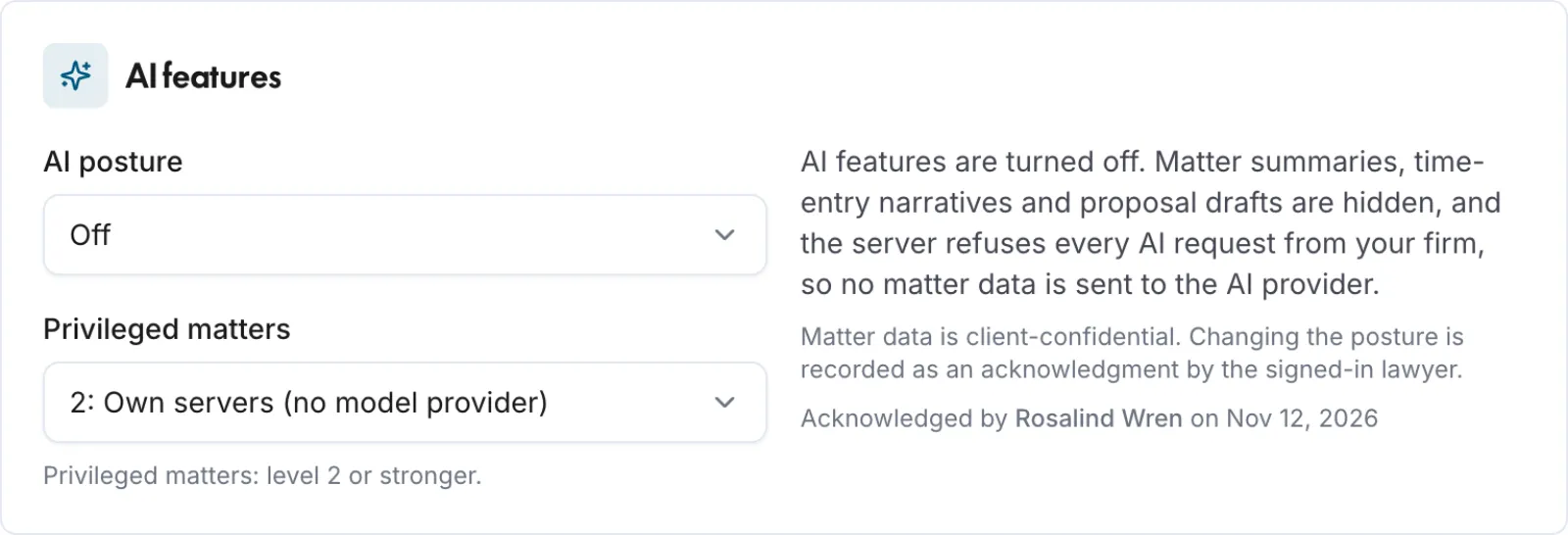
The choices in AI posture are:
- Off: no AI at all. The AI cards are hidden and the server refuses every AI request from your firm.
- On: self-hosted install: for a LexBooks installed on your own computers.
- On: hosted service (US provider): the AI provider listed in the Data Processing Agreement.
- On: EU preference (not yet routed to the EU): this choice does not run yet, as the card says.
Accept the statement for level 3
Level 3 sends privileged material to a cloud provider, so LexBooks asks an administrator to accept a statement for the firm first.
- Choose 3: Zero-retention cloud provider in Privileged matters. If the card says that this installation does not offer level 3, the choice cannot be made.
- Read the statement in the box that appears. It explains that the provider keeps none of the material and does not train on it, that it is not your own server, and that you can withdraw the choice at any time.
- Click I accept for my firm, or Cancel.
LexBooks records your name, the time and the version of the statement. The card then shows who accepted and when. If the statement changes, AI on matters pauses until an administrator accepts the new version.
What happens next
The AI cards appear on matters, on the Time page and in the proposal editor. Every change to the AI posture is recorded with the name of the person who made it.
If something looks wrong
- The choices are greyed out. Only an administrator can change the AI settings.
- An AI card says that nothing was sent because the matter requires a stronger level. No AI service at that level is set up for your installation. An administrator can review the level in Settings, or on the matter.
- A notice says “AI on matters is paused until an administrator of your firm reviews and accepts the updated statement in Settings”. The statement for level 3 has changed since your firm accepted it. An administrator reads the new statement on the card and clicks I accept for my firm.
- A notice says AI features are paused on this installation. The operator of your installation must finish a technical step. Nothing is sent meanwhile. Write to support@lexbooks.app.