AI on a matter: its privacy level and its summary
When AI is on for your firm (see Turn on AI), a matter's page has an AI summary card and a card for the matter's own privacy level. The Time page and the proposal editor have two AI helpers.
The matter's privacy level
Each matter follows the firm's level unless an administrator sets a stricter one, for example for a matter with very sensitive material.
- Open the matter.
- Find the card AI privacy level. It shows “Firm default” or the matter's own level, who set it and when.
- Click Change. (Only administrators see this button.)
- Choose the level in AI privacy level.
- Write why in Reason (kept on record). The reason must be at least 10 characters long; until it is, the card tells you so under the Save button.
- Click Save.
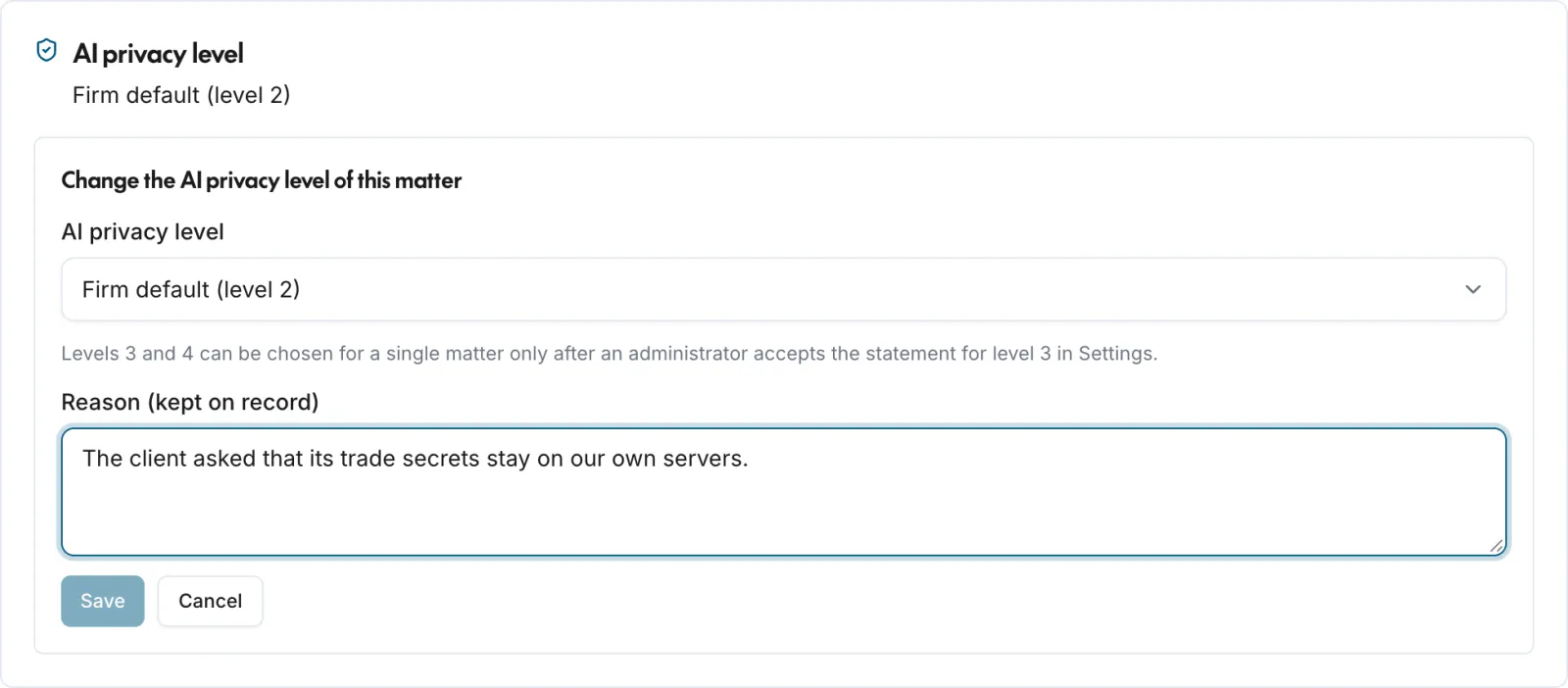
If you choose a weaker level than the firm's, LexBooks warns you before you save. Levels 3 and 4 can be chosen for a single matter only after an administrator has accepted the statement for level 3 in Settings (see Turn on AI). Every change is kept in the firm's audit log.
The AI summary
The summary is a short timeline of the matter, written from what is recorded on it: time entries, dates, tasks, invoices and documents.
- Open the matter.
- In the card AI summary, click Generate.
- Read the summary. Under it, a line tells you the privacy level used, the date and the model.
When the matter has newer activity, the card says the summary is stale. Click Refresh to write it again. The summary is AI-generated: verify it before relying on it.
Polish time entries
- Click Time in the left-hand menu.
- Click the More actions button (three dots) and choose Polish narratives. It appears when you have draft time entries.
- For each entry, compare Original and Polished. Click Accept, Edit or Reject.
- Click Done.
The original wording is kept on the entry.
A first draft of a proposal's scope
- In a proposal or letter, on the details step, click AI draft next to the line items.
- If you want, say what to cover in Anything specific to cover? (optional).
- Click Draft with AI.
- For each suggested paragraph or line, click Insert, Edit or Discard. Nothing is added until you insert it. Prices always stay yours: suggested lines are added without a price.
If something looks wrong
- There is no AI card on the matter. AI is off for your firm. An administrator can turn it on in Settings.
- The Save button stays grey on the privacy level. Write a reason of at least 10 characters.
- Levels 3 and 4 are missing from the list. Your firm has not accepted the statement for level 3. An administrator can accept it in Settings, in the card AI features.
- “Could not generate summary”. Try again in a moment. If the card says nothing was sent because of the matter's level, see Turn on AI.